Claude Code outage: Codex takes over
My rules, memory and locks are plain text files. Codex reads them just as Claude Code does, and can pick up the work when one of the two stops.
On 13 November 2026, Claude had two incidents on the same day. In the morning, from 10:58 to 12:58 Paris time, signing in to claude.ai and Claude Code was broken. In the afternoon, from 14:09 to 16:38, claude.ai, the API and Claude Code returned errors. That makes four and a half hours in the middle of a working day.
On my side, Claude Code asked me to sign in again twice that morning, with a 403 error. The sessions I already had open kept answering, and I did not have to switch tools. I still asked myself the question: if Claude Code stops for a whole day, what stops with it?
Not much. Most of my harness is stored in plain text files, next to the tool. Claude Code is the one I use most. Codex, OpenAI’s tool, reads the same files and can pick up the work.
What stops with a tool
Take someone who has built everything inside a single application: their instructions are in the settings, their habits in the conversation history, their automations in the application’s scheduled tasks. During an outage, they can open another tool. But that tool knows nothing about their rules, their projects or what it must never do.
On 13 November, the status page also reported that scheduled tasks hosted by Claude were starting more than two hours late, and that some runs had been skipped.
The shared core
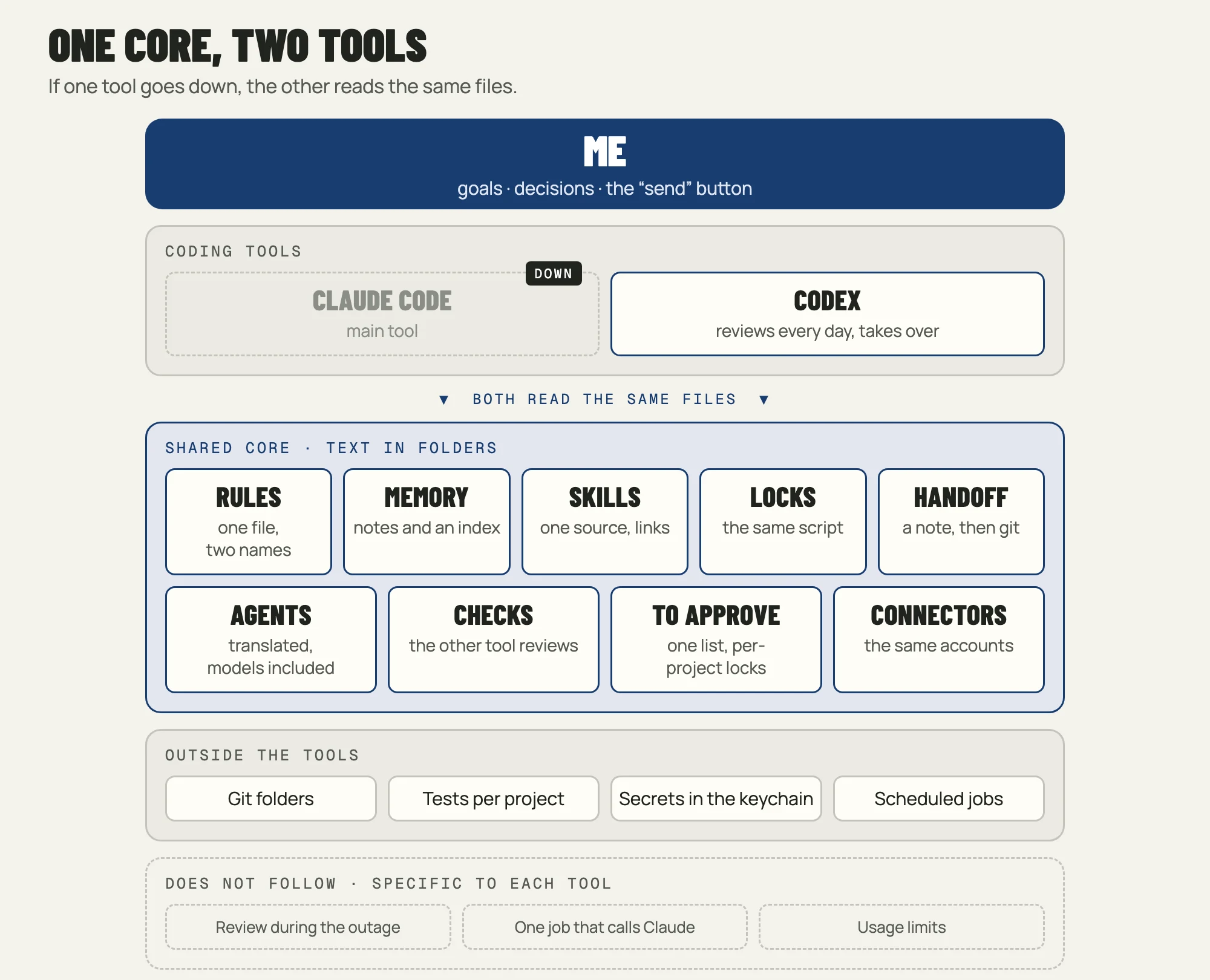
During the last review of my system, everything that matters was moved out of the tools and into folders that both can read.
Rules: a single file
My global rules are in an AGENTS.md file, an open format that Codex reads directly. Claude Code reads it through a symbolic link: it is the same file under a second name, and I edit it in one place. Each project has its own as well. When a project only has the file specific to Claude Code, one line of configuration tells Codex to read that one.
~/.claude/rules/shared.md  →  ~/.codex/AGENTS.md
project_doc_fallback_filenames = ["CLAUDE.md"]
I have the record of it. On 13 November at 15:17, during the second incident, Codex was reviewing three guides on one of my sites. Its log starts with my rules, in order: the ban on contacting certain companies, the rules shared by both tools, then the project’s own.
Memory: a folder of notes
The memory is a folder of about fifty short notes, with an index of one line per note. Both tools read the index and can add a note, in the same format.
Skills: one source, links
Each skill has a single source. Those used by both tools, four for now, are linked into Codex’s folder with a symbolic link.
Locks: the same script
The script that blocks an email addressed to an excluded company is a single file, wired into both tools. If I move to Codex, that red line comes with me.
Agents: one source, two formats
My 15 specialised agents are written for Claude Code, one text file per agent. A script translates them into Codex’s format at the start of every session, in either tool. It also translates the choice of model: in both tools, the most expensive model supervises and the agents run on a cheaper one. I edit an agent in one place, and Codex has the same ones on the day I switch.
End-of-session checks: the reviewer changes sides
The same script runs at the end of every session in both tools. It runs the project’s fast tests, then asks the other tool for a review when the change is large enough: Codex reviews Claude Code, and Claude reviews Codex. In a trial with a bug planted on purpose, Claude flagged it in ten seconds. During a Claude outage, the tests still run under Codex.
Commands that need my approval: a single list
Pushing code or deploying a site requires my approval. These commands are in a single list, and the same script derives both tools’ settings from it: an approval request in Claude Code, the same in Codex. The script does the same for locks specific to one project, such as a deployment forbidden in a single folder. When a ban has no exact translation, Codex asks for my approval instead of blocking.
Connectors: the same accounts
My two Google accounts go through a small server installed on my Mac, which both tools can call. So Codex reads the same inboxes and calendars as Claude Code, and the server itself refuses to write to an excluded company.
On 13 November, these four things existed only in Claude Code. I aligned them the next day, while preparing this article.
Tests, secrets and scheduled jobs
Each project has a map of its tests: which command to run after which change. It is a text file that either tool can follow. My API keys are in the Mac keychain, and scripts read them directly. My scheduled jobs run on my Mac, on Cloudflare, on GitHub Actions and on Firebase: a Claude Code outage does not stop them, with one exception described below.
Handing over between the two tools
When a tool stops in the middle of a task, the other one needs to know where things stand. My rule asks for a handoff note at the root of the project: the goal, the branch, the uncommitted changes, the last check that passed, the next action and what I have already authorised. It starts with the date, the tool that wrote it and the state of the code.
The tool that takes over compares the note with the real state of the folder before continuing. If the note is more than a day old, it asks me again for the authorisations it contains.
This note has a limit. In a sudden outage, Claude Code has no time to write it. Git then does the job: almost all my projects are versioned, and the first shared instruction is to look at the state of the folder before touching it. Codex sees what has changed, even without a note.
What does not follow
Three things remain that I lose when I move to Codex:
- The review by a second model: during a Claude outage, there is no reviewer left. The tests run, but nobody reviews.
- One scheduled job calls Claude: of the nine that run on my Mac, my AI news watch has it write a draft post. During an outage, the job fails, says so in its log, and I run it again later.
- My Codex subscription is the smallest one, at €20 a month, with lower usage limits. In an outage, I finish what is in progress and postpone the rest.
So on Codex I keep the same rules, the same agents, the same checks and the same accounts, with less headroom. For an outage of a few hours, that is enough.
A backup that is used every day
A backup plan that is never tried has little chance of working on the day it is needed. Mine is used every day: as soon as a change gets large enough, Codex reviews Claude Code’s work. It opens the same folders, reads the same rules and runs the same commands. If a shared file were broken, I would see it within the week.
The protection works the other way round. If Codex does not answer, the automatic review is skipped and Claude Code carries on. It also covers a change in price, usage limits or model: I can change tools without rewriting my rules.
For your own setup
- Write your rules in a text file that several tools can read, such as
AGENTS.md. If your main tool wants its own file, point it to the first one. - Keep your memory and your procedures in folders you own, outside an application’s history.
- Run your scheduled jobs on your own machine or with your hosting provider.
- Install a second tool and give it real work every week, a review for example.
- When a setting has to exist in both tools, write it once and have a script generate the other.
- List what does not follow, so that you do not discover it during the outage.
On 13 November, I did not have to switch tools. The day I do, I will open Codex in the same folder and ask it to read the state of the project before continuing.